

Web Image Formats
Images are one of the most essential parts of the internet. Whether you are reading a blog post or reviewing a product on an e-commerce site, you always encounter visuals. However, most people do not realize that the pictures used on websites are not only for aesthetics but also play a critical role in performance and SEO. This is where web image formats come into play.
Choosing the right format directly affects the speed of a webpage. An incorrect choice can cause the same picture to load at three times the file size. This slows down the page, reduces visitor satisfaction, and negatively impacts Google rankings. In short, knowing which image formats to use is crucial not only for designers and developers but also for anyone producing content.
The Role of Images on the Web
When a visitor enters a website, the first impression is often shaped through visuals. Images enhance the appearance of a page, deliver information faster, and enrich the user experience. But behind the scenes, how these images are processed and in which image formats they are delivered is a decisive factor for the success of the site.
Search engines also track this closely. Google has clearly stated that page speed is one of its ranking criteria. The more optimized your images and their formats, the higher the chance your site will rank in search results.
Raster vs Vector Images
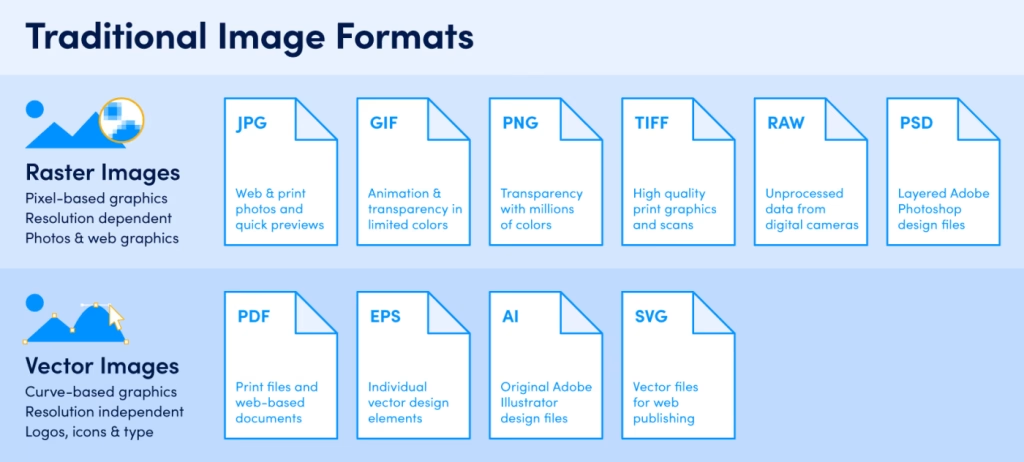
To understand image formats, we first need to divide them into two categories: raster and vector.
Raster Images
These are made up of pixels. Each pixel has a specific color, and together they form the picture. Photos taken by cameras, screenshots on our phones—in short, all real-life captures—are raster-based. When zoomed in, pixels become visible and create blurriness.
Vector Images
These are based on mathematical formulas. Lines, shapes, and colors are described with numbers. Therefore, you can enlarge or shrink them as much as you like without losing quality. Logos, icons, and graphic illustrations are usually in vector image formats.
This distinction will appear often throughout the article. Some formats are raster-based (like JPEG, PNG, WebP), while others are vector-based (like SVG).
Raster image formats are also known as bitmap image file formats, and Vector format which is also known as scalable image file formats.
Raster format displays static images composed of pixels, tiny squares of color that form a grid. Each pixel has a defined color, position, and proportion based on the image resolution. The higher the resolution, the more pixels there are, and the higher the image quality.

Common raster image formats are:
- JPEG (Joint Photographic Experts Group)
- PNG (Portable Network Graphics)
- GIF (Graphics Interchange Format)
- WebP (Web Picture)
- AVIF (AV1 Image Format)
Vector format display images using mathematical equations, lines, and curves that define each element’s shape, border, and fill color. There are no pixels in a vector image file format.
The most common vector image formats are
- SVG (Scalable Vector Graphics)
- EPS (Encapsulated PostScript)
- AI (Adobe Illustrator Artwork)
- PDF (Portable Document Format)
These formats are all raster image formats, meaning they display static images composed of pixels. Each pixel has a defined color, position, and proportion based on the image resolution. Raster images can produce high-quality photos and graphics, but they also have some limitations.
Why Is Choosing the Right Format Critical?
If you save a photo as PNG, the size can be dozens of megabytes. The same picture saved as JPEG might shrink to just a few megabytes. With modern image formats like WebP or AVIF, the size drops even further. This difference is one of the most important factors in determining website speed.
Each format also has unique strengths: some support transparency, some allow animation, while others represent colors more realistically. Picking the right image formats improves both user experience and SEO performance.
CTA: Don’t Miss What’s Next!
GIF, JPEG, PNG, WebP, AVIF, and SVG… Each has its own story, technical features, and SEO impact. But which one is best for your site? Let’s start with the very first format in history—GIF from 1987.
Master Image Formats Comparison Table
| Format | Compression | Colours / Depth | Transparency | Animation | File Size | Extension | Browser Support | Best For |
|---|---|---|---|---|---|---|---|---|
| JPEG/JPG | Lossy | > 16 million | ❌ No | ❌ No | Small | .jpg / .jpeg | All browsers, devices | Photos, web, print, editing |
| PNG | Lossless | > 16 million | ✔ Yes | ❌ No | Large | .png | All browsers, devices | Logos, icons, text, transparency, web |
| GIF | Lossless (256 colors) | Max. 256 | ✔ Yes (1-bit) | ✔ Yes | Small–Large | .gif | All browsers, devices | Simple animations, retro web graphics |
| BMP | None (Uncompressed) | Variable | ❌ No | ❌ No | Very large | .bmp | Limited (legacy) | Old Windows apps, archives |
| TIFF | Lossless | Variable | ✔ Yes | ❌ No | Large | .tif / .tiff | Limited (desktop apps) | High-quality printing, scanning, archives |
| WebP | Lossy / Lossless | 16.7M+ colors | ✔ Yes | ✔ Yes | Smaller | .webp | Chrome, Firefox, Edge, Opera | Web photos, icons, animations |
| AVIF | Lossy / Lossless | 10/12-bit HDR | ✔ Yes | ✔ Yes | Smallest | .avif | Chrome, Firefox, Edge, Opera | Next-gen photos, transparency, animations |
| SVG | Vector-based | Infinite scale | ✔ Yes | ✔ Yes | Very small | .svg | All browsers, devices | Logos, icons, infographics, UI/UX |
| HEIC/HEIF | Lossy / Lossless | > 16M+ colors | ✔ Yes | ❌ Limited | Smaller | .heic / .heif | Chrome, Firefox, Edge, Opera | iPhone photos, iCloud storage |
| PSD | Variable | Variable | ✔ Yes | ❌ No | Large | .psd | Limited (Adobe only) | Design & editing |
| RAW | Uncompressed / Variable | > 68 billion | Variable | ❌ No | Very large | .raw (various) | Limited (software only) | Professional photography, editing |
BMP Format (Bitmap – 1980)
History and Origins
BMP (Bitmap Image File) was developed by Microsoft in the late 1980s. It was the default image format for the Windows operating system for many years. At that time, graphic processing technologies were not as advanced as today. Users needed a simple, fast, and fully compatible format to open images.
BMP fulfilled this need. Since it stored visuals without compression, it was easy to read and process. However, file sizes were very large, and over time it was replaced by more efficient image formats like JPEG and PNG.
Innovations Brought by BMP
For its era, BMP had several advantages:
- Simple structure: Images could be read quickly without compression.
- Windows compatibility: Recognized by default in the Windows OS.
- Color flexibility: Supported everything from 1-bit black-and-white to 24-bit millions of colors.
- Hardware support: Worked directly with older printers and scanners.
Because of these benefits, BMP was widely used in the 1990s, especially during the Windows 95 and Windows 98 era.
Technical Features
- Color depth: 1-bit, 4-bit, 8-bit, 16-bit, 24-bit, even 32-bit.
- Compression: By default none, though simple RLE compression existed.
- Transparency: Not supported.
- Animation: Not supported.
- File size: Very large, since there’s no compression.
The biggest advantage of BMP was its simplicity; its biggest drawback was oversized files.

How Does It Work? (Simple Example)
BMP stores each pixel exactly as it is.
Example:
A 100×100 image →
Each pixel = 3 bytes (RGB) →
100 × 100 × 3 = 30,000 bytes (~30 KB).
In contrast, the same image in JPEG or PNG could be reduced to ~5 KB. With BMP, quality never drops, but storage cost is very high.
Advantages of BMP
- Simple and fast processing.
- No quality loss—data is fully preserved.
- Broad support in early printers, scanners, and Windows apps.
- Flexible color depth options.
Disadvantages of BMP
- Extremely large file size—unusable for the web.
- No transparency.
- No animation support.
- Limited support in modern browsers.
Because of these drawbacks, BMP has almost disappeared from the internet. Today it is used only for archival or technical testing purposes.
Use Cases
- Old Windows software (default image format).
- Scientific and technical projects (raw data storage).
- Graphic development tests (when compression-free is needed).
- Archiving pure, raw visuals.
However, it is absolutely not recommended for modern websites. Instead, PNG, JPEG, or WebP are far more efficient.
Summary: The Strengths and Weaknesses of BMP
While BMP once played an important role in history, it is now obsolete for the web. Its greatest strength was simplicity, but its greatest weakness was oversized files. That is why modern image formats have completely replaced it in today’s web ecosystem..
TIFF Format (1986)
History and Origins
TIFF (Tagged Image File Format) was developed in 1986 by Aldus Corporation and was soon acquired by Adobe. At that time, desktop publishing was rapidly growing. Professional printers and scanners needed a high-quality, flexible, and versatile solution.
TIFF was designed to meet this need. It quickly became the standard in the printing industry. Photo studios, magazines, newspapers, and publishing houses relied on TIFF for years. The reason was simple: it supported multiple color modes, allowed high-resolution printing, and enabled storage without data loss, making it one of the most valuable image formats of its era.
Innovations Brought by TIFF
TIFF introduced advanced features compared to its competitors at the time:
- Versatility: Supported both lossy and lossless compression.
- High resolution: Could store massive images suitable for printing.
- Multi-layer support: Could include multiple pages or layers in one file.
- Color flexibility: Supported everything from black-and-white to CMYK.
- Metadata support: Could store EXIF data from cameras.
Thanks to these features, TIFF became one of the most preferred image formats for professional designers and print centers.
Technical Features
TIFF is technically rich and powerful:
- Color depth: From 1-bit to 32-bit.
- Color modes: RGB, CMYK, Grayscale, Lab Color.
- Compression: Both lossless (LZW, ZIP) and lossy (JPEG-based).
- Multi-page support: Multiple pages in a single file.
- File size: Can be extremely large (100 MB to several GB).
These features make TIFF unique for printing and archiving, even though it is heavy for web use.
How Does It Work? (Simple Example)
TIFF stores images using “tags.” Along with pixel data, tags are included inside the file.
Examples:
- Tag 256: Image width
- Tag 257: Image height
- Tag 258: Color depth
- Tag 259: Compression type
That’s why it’s called Tagged Image File Format—because it stores not only the picture but also detailed information about it.
Advantages of TIFF
- Maximum quality: Lossless storage preserves details.
- Flexibility: RGB and CMYK support → perfect for printing.
- Archiving: Ideal long-term storage for photographers.
- Multi-purpose: Can contain multiple layers and pages.
- Industry standard: Widely accepted by printers and publishers.
Disadvantages of TIFF
- Very large file size → not suitable for web.
- Slow processing of large files.
- Limited browser support.
- Too professional for everyday use.
This is why TIFF disappeared from the web world, though it remains essential in professional printing.

Use Cases
- Printing: Magazines, newspapers, and books.
- Photography: High-quality archiving.
- Scanners: Digitalizing documents.
- Graphic design: Layered image storage.
- Archives and libraries: Long-term preservation.
In short, TIFF is still used in professional environments but is absolutely unsuitable for modern websites, where other image formats dominate.
Summary: The Strengths and Weaknesses of TIFF
TIFF is excellent for professional printing and archiving but impractical for the web. Its strengths lie in flexibility and quality preservation, while its massive file sizes keep it away from the internet.
GIF Format (1987)
History and Origins – The Animated Web Image Format
GIF (Graphics Interchange Format) was developed in 1987 by CompuServe. Back then, internet connections were extremely slow, and visuals needed to load quickly. GIF emerged as the solution.
Its small file size and wide browser support made it popular fast. Moreover, GIF introduced animation for the first time, revolutionizing the use of image formats online.
Innovations Brought by GIF
- Animation support: Multiple frames in one file.
- Small file size: Thanks to the 256-color limitation.
- Transparency: Single-level transparency.
- Browser compatibility: Quickly supported by all browsers.
In the 1990s, rotating logos, blinking icons, and banners on websites were mostly created as GIFs.
Technical Features
- Color depth: 8-bit (up to 256 colors).
- Compression: Lossless LZW algorithm.
- Transparency: One color could be fully transparent.
- Animation: Supported frame-by-frame simple animations.
Because of these limitations, GIF wasn’t suitable for photos but was perfect for simple graphics and animations.
How Does It Compress? (Simple Example)
GIF compresses by grouping repeating pixels.
Example:
- Normal: AAAAABBBBCCCC (12 chars)
- GIF compression: 5A 4B 4C (6 chars)
This reduces file size without losing quality, but the 256-color limit causes loss of detail.
GIF also has other features that make it compatible with animation, such as:
- It supports interlacing, which means it can display a low-resolution version of the image while loading the full-resolution one.
- It supports transparency, which allows you to create animations with transparent backgrounds or parts.
- It is widely supported by browsers, devices, and platforms, making it a universal format for web animations.
- Discuss the pros and cons of using GIFs for web images. Describe each pros and cons in one to two lines maximum and not more than that.
Some pros of using GIF for web images are:
- It can create simple animations or effects, such as banners, buttons, or loaders, without requiring any plugins or scripts.
- It can display images with solid colors or simple patterns without losing quality or introducing artifacts.
- It can be easily created and edited using various tools or online services.
Some cons of using GIF for web images are:
- It is restricted to 256 colors, which can result in poor quality or dithering in images with more colors or gradients.
- It has a larger file size than JPEG or PNG, especially for long or complex animations, which can affect loading time and bandwidth usage.
- It does not support sound or interactivity, which can limit its functionality and appeal.
Ideal scenarios to use GIFs for web images:
- Use GIFs for short or simple animations with few colors or frames, such as icons, emojis, or stickers.
- Use GIFs for images with solid colors or simple patterns, such as logos, text, or cartoons.
- Avoid using GIFs for photos or complex images that have many colors, details, or gradients, as they will result in poor quality or large file sizes.

Use Cases
Today GIF is less common in professional websites but still popular in:
- Social media: Memes and funny short animations.
- Messaging apps: Expressing reactions.
- Websites: Loading animations, small icons.
- Advertising: Simple banner animations.
Despite its color limitations, GIF has secured an unforgettable place in internet culture.
Top 5 Classic Uses of GIF
- Memes and fun animations
- Loading spinners
- Reaction images in forums
- Early web banners
- Pixel art and retro graphics
JPEG Format (1992)
History and Origins – The Most Widely Used Web Image Format
JPEG (Joint Photographic Experts Group) became a standard in 1992, named after the team of experts who developed it. GIF’s 256-color limit wasn’t enough for realistic photos. JPEG filled this gap, starting a revolution in image formats.
Its main advantage was supporting over 16 million colors, making photos look realistic on computers and websites. At the same time, lossy compression reduced file sizes, which was a breakthrough for the slow internet era.
By the late 1990s, digital cameras adopted JPEG as the dominant image format because it balanced storage efficiency with sufficient quality for both printing and online use.
Innovations Brought by JPEG
- Realistic colors: 24-bit depth → 16.7 million colors.
- Small file size: Lossy compression shrinks huge images.
- Progressive JPEG: Loads blurry first, then sharpens (good for slow internet).
- EXIF metadata: Saved camera, lens, ISO, shutter speed, etc.
These features made JPEG not just another format but the backbone of the digital visual ecosystem.
Technical Features
- Color depth: 24-bit, 16.7 million colors.
- Compression: Lossy, adjustable quality 0–100%.
- Transparency: Not supported.
- Animation: Not supported.
- File size: Flexible, based on compression level.
JPEG’s biggest strength is flexibility—reduce quality for tiny sizes or keep high quality at a larger size.
How Does It Compress? (Simple Example)
JPEG divides an image into 8×8 pixel blocks and removes details the human eye can’t notice.
Example:
- Original sky: 123, 124, 125, 123, 124
- JPEG compression: 124, 124, 124, 124, 124
The result: Invisible loss, but a much smaller file size.
How does JPEG’s compression work?
JPEG compression works by dividing the image into blocks of 8×8 pixels and applying a discrete cosine transform (DCT) to each block. The DCT converts the pixel values into frequency coefficients, which are then quantized and encoded. The quantization step is where the loss of quality occurs, as some of the coefficients are rounded off or set to zero. The higher the compression level, the more coefficients are discarded, and the lower the quality of the image.
Some pros of using JPEG for web images are:
- It supports millions of colors and can produce high-quality photos with realistic details and gradients.
- It is widely supported by browsers, devices, and platforms.
- It can be easily compressed and optimized to reduce loading time and bandwidth usage.
Some cons of using JPEG for web images are:
- It does not support transparency or animation.
- It can introduce artifacts, noise, or blurriness when compressed too much or resized.
- It can lose quality every time it is edited or saved. This is known as JPEG degradation.
When to use JPEG for web images?
Some scenarios or use cases when using JPEG for web images are:
- Use JPEG for photos or complex images that have many colors, details, or gradients.
- Avoid using JPEG for logos, icons, text, or simple graphics that need sharp edges or transparency.
- Choose an appropriate compression level that balances quality and file size. Aiming for 60-80% quality is a good rule of thumb.

Limitations of JPEG
- No transparency (unlike PNG or WebP).
- No animation (GIF wins here).
- Quality degrades if repeatedly compressed and saved.
Still, JPEG remains the most common image format for photos worldwide.
Use Cases
- Photography: Landscapes, portraits.
- Blogs & news: Content images.
- E-commerce: Product photos.
- Social media: Facebook, Instagram defaults.
- Digital cameras: Standard capture format.
Summary: The Strength of JPEG
Since its introduction, JPEG has been the most widely used image format. Its dominance comes from balancing realistic color support with manageable file sizes. Despite its flaws, it remains the best choice for photo-based content.
Pros vs Cons
| Pros | Cons |
|---|---|
| Supports 16.7M colors | No transparency |
| Small file size | Lossy compression |
| Universal browser support | Quality degrades after resaves |
PNG Format (1996)
History and Origins – The High-Quality Web Image Format
PNG (Portable Network Graphics) was developed in 1996. The reason behind its creation was the patent issues of the GIF format. At that time, GIF used the LZW compression algorithm, which was patented and caused legal problems for commercial use. The open-source community decided to create a new format that everyone could use freely. That’s how PNG was born.
The main goal of PNG was to provide stronger features without patent restrictions. Especially its transparency support and lossless compression made it a strong alternative among image formats, standing between GIF and JPEG.
Innovations Brought by PNG
When PNG was released, it offered several improvements over GIF and JPEG:
- Lossless compression: No quality loss even when compressed.
- Transparency support: Through the alpha channel, multiple levels of transparency were possible, making it ideal for logos and icons.
- Wide color support: 24-bit and 48-bit depth, showing millions or even trillions of colors.
- Open-source: Free to use without licensing issues.
These features turned PNG into one of the most valuable image formats for designers, graphic artists, and web developers.
Technical Features
- Color depth: 24-bit (16.7 million colors) or 48-bit (281 trillion colors).
- Compression: Lossless, meaning files shrink but quality stays intact.
- Transparency: Pixel-level transparency via alpha channel.
- Animation: Not supported (but later extended with APNG).
PNG is particularly ideal for sharp-edged graphics, logos, and icons. Thanks to its lossless nature, text and lines remain crisp—something many other image formats can’t guarantee.
How Does It Compress? (Simple Example)
PNG uses the DEFLATE algorithm for compression. Instead of writing repeating data multiple times, it stores it in shorter forms.
Example:
- Original: AAAAABBBBBCCCCCDDDD (20 characters)
- PNG compression: 5A 5B 5C 4D (8 characters)
Result: Smaller file size with no loss of quality. That’s why PNG is considered a lossless image format.
PNG also has some other features that make it a high-quality web image format, such as:
- It supports transparency and alpha channel, which allows you to create images with smooth edges and backgrounds.
- It supports interlacing, which means that it can display a low-resolution version of the image while loading the full-resolution one.
- It can handle text, logos, icons, illustrations, or simple graphics with sharp edges and solid colors without losing quality or introducing artifacts.
Some pros of using PNG for web images are:
- It preserves the quality and details of the original image, even after multiple edits or saves.
- It offers better compression than GIF for images with more than 256 colors or with transparency.
- It can display images with smooth gradients without banding or posterization.
Some cons of using PNG for web images are:
- It has a larger file size than JPEG or GIF, which can affect loading time and bandwidth usage.
- It has a limited color depth of 8 bits per channel (24 bits for RGB or 32 bits for RGBA), which can result in banding or posterization in images with smooth gradients.
When to use PNG for web images?
- Use PNG for images that need transparency or alpha channel, such as logos, icons, overlays, or cutouts.
- Use PNG for images with text, logos, icons, illustrations, or simple graphics with sharp edges and solid colors, such as charts, diagrams, or screenshots.
- Avoid using PNG for photos or complex images that have many colors, details, or gradients, as they will result in large file sizes and poor compression.
Differences Compared to JPEG and GIF
- JPEG vs PNG: JPEG is lossy and better for photos, while PNG is lossless and better for sharp graphics.
- GIF vs PNG: GIF supports only 256 colors, but PNG supports millions. PNG also has advanced transparency.
The only drawback of PNG is larger file sizes compared to JPEG. That’s why it isn’t ideal for photos but excels in other types of image formats.
Use Cases
PNG has a wide range of uses in modern web design:
- Logos: Perfect when transparency is needed.
- Icons: Works best for sharp, detailed visuals.
- UI design: Buttons, menus, graphic elements.
- Infographics: Text and shapes remain clear.
- Screenshots: No quality loss when capturing text.
In short, PNG is one of the most versatile image formats where clarity and transparency are essential.

Limitations of PNG
- Not suitable for photos (file size becomes too large).
- Animation support is limited (APNG exists but not widely used).
- Large files may slow down websites.
That’s why PNG is mostly chosen for logos, icons, and graphics, while JPEG or WebP are better image formats for photos.
Summary: The Strength of PNG
PNG has remained one of the most trusted image formats since its launch. Its unbeatable trio of transparency, lossless compression, and wide color support makes it indispensable for designers. While it may not be ideal for photos, it remains a must-have format for logos and sharp-edged graphics.
PNG vs JPEG Quick Comparison
| Feature | PNG | JPEG |
|---|---|---|
| Transparency | ✔ Yes | ❌ No |
| Compression | Lossless | Lossy |
| Best for | Logos, Icons | Photographs |
WebP Format (2010)
History and Origins – The Next-Generation Web Image Format
WebP was introduced by Google in 2010. By then, the internet was mainstream, but page speed was still a big issue—especially with the rise of mobile users. Websites needed lighter yet high-quality image formats.
JPEG was good for photos, PNG for transparency, and GIF for animations. But using all three increased storage and slowed websites. Google created WebP to unify these features in one format.
Its bold claim: Smaller than JPEG, more flexible than PNG, and more modern than GIF. This made WebP one of the most revolutionary image formats.
Innovations Brought by WebP
- Smaller file size: 25–35% smaller than JPEG at the same quality.
- Dual compression: Supports both lossy and lossless compression.
- Transparency: Full alpha channel support like PNG.
- Animation: Can replace GIF with better performance.
- Wide browser support: Initially Chrome and Android only, later extended to Firefox, Edge, and Safari.
This made WebP the default image format for modern websites.
Technical Features
- Origin: Based on Google’s VP8 video codec.
- Compression: Both lossy and lossless options.
- Color depth: 24-bit color + 8-bit transparency.
- Animation: Supported, unlike JPEG or PNG.
- Metadata: EXIF and XMP support.
These technical strengths made WebP one of the most versatile image formats ever created.
How Does It Compress? (Simple Example)
Unlike JPEG, WebP avoids redundant data.
Example: A sky photo with hundreds of identical blue pixels:
- JPEG: Records each block separately.
- WebP: Saves one reference and applies it to all.
Result: Smaller size, same quality. A big win over older image formats.
Advantages of WebP
- Lightweight → boosts mobile performance.
- One format for photos, logos, icons, and animations.
- SEO-friendly → Google PageSpeed scores improve.
- Fully supported in all modern browsers.
Limitations of WebP
- Limited support in old browsers (IE, older Safari).
- Slightly higher processing power required than JPEG.
- Editing support not universal in design tools.
Despite these, WebP is one of the most reliable image formats for today’s web.
WebP works by applying different compression methods depending on the type and content of the image. For lossy compression, WebP uses predictive coding to encode an image, similar to JPEG. Predictive coding uses the values in neighboring blocks of pixels to predict the values in a block, and then encodes only the difference.
For lossless compression, WebP uses already-seen image fragments to reconstruct new pixels, similar to PNG exactly. WebP also supports interlacing, which means that it can display a low-resolution version of the image while loading the full-resolution one.
WebP is designed to be a versatile and efficient image format for the modern internet era, where speed and quality are essential. WebP can handle any kind of web image with optimal quality and performance, whether a photo, a logo, an icon, or an animation.
Some pros of using WebP for web images are:
- It offers much better compression than JPEG, PNG, or GIF for any type of image, reducing the file size by 25-34% compared to JPEG and by 20-50% compared to PNG.
- It supports both lossy and lossless compression, animation, and transparency, making it suitable for any type of image.
- It can produce high-quality images with more details, colors, and gradients than JPEG or GIF, without introducing artifacts or noise.
Some cons of using WebP for web images are:
- All browsers, devices, and platforms do not fully support it. According to Can I Use, WebP has global support of 94.8% as of October 2022. However, some browsers such as Safari or Internet Explorer, do not support it natively.
- It requires additional tools or plugins to create, edit, or convert WebP images.
When to use WebP for web images?
Use WebP for any type of web image that you want to optimize for quality and performance. They are ideal for almost all scenarios.
Use Cases
- Websites: Blogs, news sites, corporate portals.
- E-commerce: Faster product photo loading → more conversions.
- Mobile apps: Less data, faster visuals.
- Animations: Modern replacement for GIF.
Especially in WordPress, plugins like WebP Converter and caching tools make it a widely adopted image format.

Summary: The Strength of WebP
WebP combines the best of JPEG, PNG, and GIF into one. Its small size, transparency, animation, and SEO benefits make it a foundation of modern web design. Google’s focus on speed has accelerated its adoption, making WebP one of the most future-proof image formats.
WebP Performance Gains
| Format | File Size | Saving vs JPEG |
|---|---|---|
| JPEG | 200 KB | – |
| WebP | 130 KB | 35% smaller |
AVIF Format (2019)
History and Origins
AVIF (AV1 Image File Format) was introduced in 2019 by the Alliance for Open Media, backed by Google, Netflix, Amazon, Microsoft, Mozilla, and Intel. The aim was to create a royalty-free, open-source standard.
Built on AV1 video codec technology, AVIF achieved both high quality and smaller sizes. It took WebP’s advantages further and positioned itself as the next-generation image format.
Innovations Brought by AVIF
- Superior compression: 20–30% smaller than WebP at equal quality.
- HDR support: More vivid brightness and contrast.
- 10–12-bit colors: More accuracy than JPEG’s 8-bit and WebP’s 8-bit.
- Lossy + lossless compression: Both supported.
- Transparency & animation: Combines features of PNG and GIF.
These advancements made AVIF one of the most powerful image formats for the future.
Technical Features
- Origin: Based on AV1 video codec.
- Color depth: 8, 10, 12-bit support.
- HDR support: Richer visuals.
- Compression: Both lossy and lossless.
- Transparency: Fully supported.
- Animation: Multi-frame support.
- File size: Smaller than WebP.
This makes AVIF the most efficient of all modern image formats.
How Does It Compress? (Simple Example)
Similar to WebP but with more advanced methods:
- JPEG: Records each tone separately.
- WebP: Groups tones with references.
- AVIF: Splits into smaller blocks and removes even the tiniest imperceptible differences.
Result: Smaller size, nearly identical quality—outperforming other image formats.
Advantages of AVIF
- Smallest file size (20–30% smaller than WebP).
- HDR and wide color support.
- Transparency + animation built in.
- Backed by major tech giants → future-proof.
Limitations of AVIF
- Browser support still expanding (Chrome, Firefox, Safari support newer versions).
- Higher processing power needed.
- Not fully integrated into all CMS and design tools yet.
Still, AVIF is set to dominate as one of the leading image formats of the future.

Use Cases
- Websites: For speed and optimization.
- E-commerce: High-quality yet lightweight product images.
- Video platforms: HDR-ready visuals.
- Gaming: Vivid graphics.
- Mobile apps: Faster load, less data usage.
With companies like Google, Netflix, and Amazon investing, AVIF is destined to become the next standard image format.
Summary: The Strength of AVIF
AVIF perfectly balances high quality, small file size, and modern features. While still spreading, it is expected to become one of the most widely used image formats in the near future.
Why AVIF is Future-Proof?
- HDR support for vibrant visuals
- 10/12-bit color depth
- 30% smaller than WebP
- Backed by big tech companies
SVG Format (1999)
History and Origins
SVG (Scalable Vector Graphics) was developed in 1999 by W3C. Raster-based image formats like JPEG, PNG, and GIF had limitations: pixelation when scaled, large file sizes, and lack of flexibility. SVG solved these issues.
Its biggest difference: being vector-based. Instead of pixels, it uses mathematical formulas. This makes SVG infinitely scalable. A logo in SVG looks perfect on both a business card and a giant billboard.
Innovations Brought by SVG
- Infinite scalability without pixelation.
- Lightweight files thanks to vector design.
- Dynamic structure: Editable via CSS and JavaScript.
- SEO-friendly: Text inside SVG is readable by search engines.
That’s why SVG has become one of the most popular image formats for logos, icons, and modern UI design.
Technical Features
- Structure: XML-based.
- Compression: Naturally small, further compressible with GZIP (SVGZ).
- Color support: Unlimited via CSS.
- Animation: Possible with CSS/JS.
- Text support: Can contain searchable text.
Unlike raster image formats, SVG is both a visual format and an interactive web element.
How Does It Work? (Simple Example)
- Raster: Stores each pixel (e.g., JPEG → “This pixel is red, this is blue”).
- SVG: Stores drawing instructions (e.g., “Draw a 200px black line”).
This makes SVG fundamentally different from other image formats.
Advantages of SVG
- Resolution-independent.
- Responsive-friendly.
- Very small file size for icons/logos.
- SEO contribution via text readability.
- Easily editable even in a text editor.
Limitations of SVG
- Complex images increase file size.
- Not suitable for photos.
- Security risks if injected with malicious code.
Use Cases
- Logos.
- Icon sets.
- Infographics.
- Animations.
- UI/UX design.
Summary: The Strength of SVG
SVG is essential in modern design thanks to scalability, lightweight nature, and interactivity. While raster image formats remain better for photos, SVG dominates in logos, icons, and UI elements.
SVG Use Cases in Modern Web
- Logos
- Icons
- Infographics
- UI/UX elements
- Animated graphics
ICO Format (Favicon Files)
History and Origins
ICO was developed by Microsoft in the late 1980s for Windows icons. Later, browsers adopted it as the standard favicon image format.
Technical Features
- Color depth: From 1-bit to 32-bit.
- Sizes: 16×16, 32×32, 48×48 most common.
- Multi-resolution: Multiple sizes in one file.
- Compression: BMP or PNG-based.

Use Cases
- Favicons in browsers.
- Desktop app icons.
- Windows shortcuts.
Summary
ICO may be small but remains a critical image format for branding and user experience.
HEIC Format (Apple’s Modern Format)
History and Origins
HEIC (High Efficiency Image Container) was introduced by Apple in 2017, based on the HEIF standard. Starting with iOS 11, iPhones and iPads began saving photos in HEIC by default. Its aim was to outperform older image formats like JPEG.
Technical Features
- Compression: Based on HEVC (H.265).
- Color depth: 10-bit.
- Transparency: Partially supported.
- Animation: Multiple frames supported.
- Metadata: Extensive EXIF data support.
Advantages
- 40–50% smaller files than JPEG.
- Higher color accuracy.
- Default in Apple devices.
Disadvantages
- Limited browser support.
- Not practical for direct web use.
- Usually converted to JPEG or WebP for websites.
Use Cases
- Default on Apple devices.
- iCloud storage.
- Needs conversion for web.
Summary
HEIC is popular within Apple’s ecosystem but not yet practical for web use. For online publishing, it is usually converted into other image formats like JPEG or WebP.
Quick Comparison
| Format | Main Use |
|---|---|
| ICO | Favicons, desktop app icons |
| HEIC | iPhone photos, iCloud storage |
Comparison Table of Image Formats
| Format | Release Year | Developer | Color Depth | Compression Type | Transparency | Animation | File Size | Web Compatibility | Use Case |
|---|---|---|---|---|---|---|---|---|---|
| GIF | 1987 | CompuServe | 8-bit (256 colors) | Lossless (LZW) | Limited (single color) | ✔️ | Small – Medium | All browsers | Simple animations, meme images |
| JPEG | 1992 | JPEG Group | 24-bit (16.7M colors) | Lossy | ❌ | ❌ | Medium – Small | All browsers | Photos, product visuals |
| PNG | 1996 | W3C | 24/48-bit | Lossless (DEFLATE) | Yes (alpha channel) | ❌ | Medium – Large | All browsers | Logos, icons, UI designs |
| BMP | 1980s | Microsoft | 1–32 bit | Uncompressed | ❌ | ❌ | Very large | Limited | Legacy Windows software |
| TIFF | 1986 | Aldus / Adobe | 1–32 bit | Lossless / Lossy | ✔️(limited) | ❌ | Very large | Limited | Printing, scanning, archiving |
| WebP | 2010 | 24-bit + 8-bit alpha | Lossy & Lossless | ✔️ | ✔️ | Small | All modern browsers | Modern web, e-commerce, mobile | |
| AVIF | 2019 | AOMedia | 8, 10, 12 bit | Lossy & Lossless | ✔️ | ✔️ | Very small | Most modern browsers | High-quality visuals, HDR support |
| SVG | 1999 | W3C | Unlimited (vector) | Mathematical (code) | ✔️ | ✔️(via CSS/JS) | Very small | All browsers | Logos, icons, graphics |
| ICO | 1980s | Microsoft | 1–32 bit | Simple / BMP or PNG based | ✔️ | ❌ | Very small | All browsers | Favicons, desktop application icons |
| HEIC | 2017 | Apple | 10-bit | HEVC-based (lossy/lossless) | ✔️ | ✔️(live photo) | Small – Medium | Limited | iPhone, iPad, iCloud archives |
How to Read the Table?
- Small file size → speed advantage → SEO benefit (WebP & AVIF stand out among modern image formats).
- Transparency & logos → PNG & SVG are the best.
- Animation → GIF is nostalgic, but WebP and AVIF are far superior among all image formats.
- Professional printing → TIFF remains indispensable.
- Old systems → BMP and ICO still have a place in the history of image formats.
- Mobile devices → HEIC dominates in Apple’s ecosystem.
SEO and Performance
The Impact of Images on SEO
On a website, visuals are not only used for aesthetics but also play a critical role in SEO (Search Engine Optimization). Google analyzes not only the text on a page but also the visuals and their image formats.
- Page Speed: Large images slow down the page. Slow page = poor user experience.
- Core Web Vitals: Since 2021, an official ranking factor. LCP (Largest Contentful Paint) is directly affected by images and their formats.
- Image SEO: Correct format + alt text + proper size → higher visibility in Google Images.
In short, choosing the right image formats influences not just speed but also ranking power.

The Advantage of Modern Formats
Google has long recommended using WebP and AVIF. The reason is simple:
- The same picture = 200 KB in JPEG, 120 KB in WebP, 90 KB in AVIF.
- With 10 pictures per page, that’s hundreds of KB saved.
Smaller file size → faster page load → better SEO rankings.
For example:
- An e-commerce site with 50 product photos can reduce its page size by 30% by switching to WebP.
- This directly means faster shopping experiences and higher sales—clear proof that modern image formats drive performance.
Technical Solutions and Tools
Selecting the right image formats is not enough on its own. Optimization techniques are equally important:
Responsive Images: Using the <picture> element, websites can deliver different resolutions to different devices, ensuring optimized image formats everywhere..
Lazy Load (Deferred Loading): Images load only when the user scrolls down. Improves initial load time significantly.
<picture>
  <source srcset="gorsel.avif" type="image/avif">
  <source srcset="gorsel.webp" type="image/webp">
  <img src="gorsel.jpg" alt="Ürün görseli">
</picture>
Browser and Tools for Modern Formats
With this method, if the browser supports it, AVIF or WebP is shown; if not, JPEG is displayed. This fallback system ensures compatibility while prioritizing modern image formats.
- CDN Usage: Services like Cloudflare or BunnyCDN deliver images from the closest server, making modern image formats load faster worldwide.
- WordPress Plugins: Tools like LiteSpeed Cache or WebP Converter NT can automatically optimize visuals into efficient image formats.

Core Web Vitals Impact
| Format | Avg LCP (Load Time) |
|---|---|
| JPEG | 2.5s |
| WebP | 1.8s |
| AVIF | 1.4s |
Google PageSpeed Insights and Image Optimization
In Google’s PageSpeed Insights, image-related warnings are very common:
- “Serve images in next-gen formats” → Switch to WebP or AVIF.
- “Compress images” → Reduce file sizes.
- “Serve images in appropriate sizes” → Don’t load a 2000px picture in a 200px space.
Websites that adopt these suggestions—by using optimized image formats—gain higher performance scores. That leads directly to better SEO and improved user experience.
SEO-Friendly Small Tips
- Alt text: Always describe the image with accurate words.
- File name:
red-dress.jpgis far better thanproduct123.jpgfor SEO. - Image sitemap: Helps Google index your images more effectively.
- Proper dimensions: Don’t display a 4K photo on the homepage unnecessarily—choose the right size image formats.
Summary: SEO and Performance
Image optimization = faster websites + stronger SEO rankings + happier visitors.
- Old formats (BMP, TIFF, GIF) → no longer suitable for web.
- Middle-aged formats (JPEG, PNG) → still valid but need careful use.
- Next-gen formats (WebP, AVIF) → the strongest choice for SEO and speed.
Choosing the right image formats makes the difference between a slow site and a fast, competitive one.
Conclusion and Recommendations
Which Format to Use and When?
After analyzing all image formats, here’s the best usage guide:
- Photos: JPEG or WebP are great today. For higher quality and smaller size, AVIF is the future.
- Logos & icons: SVG is the perfect choice—scalable and lightweight.
- Transparent images: PNG is still valid, but WebP and AVIF are even better.
- Animations: GIF is nostalgic but outdated. WebP and AVIF do the same job more efficiently.
- Printing & archiving: TIFF remains standard in professional fields.
- Legacy formats: BMP and GIF only matter historically in the family of image formats.
The Best Combination
For a modern website, the ideal combination of image formats is:
- SVG → logos and icons.
- WebP / AVIF → product photos and regular pictures.
- JPEG / PNG → fallback for compatibility.
This ensures speed, SEO advantage, and visual quality across devices.
CTA – Take Action Now
Have you checked which image formats your website is using?
A wrong choice might already be hurting your speed and SEO.
👉 Analyze your site and convert images to WebP or AVIF.
👉 If your logos are still PNG, convert them to SVG.
These small steps can drastically boost rankings and user satisfaction.
Quick Checklist
✔ Use WebP/AVIF for photos
✔ Use SVG for logos and icons
✔ Keep PNG only for transparent images
❌ Avoid BMP and TIFF on the web
Future Trends
- JPEG XL: Not yet mainstream, but may replace JPEG.
- AVIF: Rapidly becoming a standard across browsers.
- HEIC: Strong in Apple’s ecosystem, but limited for the web.
Adopting modern image formats like WebP and AVIF today is not just optimization—it’s a long-term investment in the future of your site.
CTA – Take the Next Step
Ready to improve your website’s speed and SEO through modern image formats?
📥 Download our optimization guide from mobilprogramlar.com and make your site faster today.
📌 Which Image Format Is Best for Your Website?
Choosing the right image format depends on your needs. If you run a blog with lightweight visuals, JPEG may be enough. For transparency and sharp logos, PNG is ideal. For modern websites aiming for maximum speed, WebP is the most balanced choice. And for those targeting the future, AVIF already outperforms WebP with smaller file sizes and HDR support.
This image formats guide provides a clear overview so you can select the best option for performance, SEO, and user experience.
👉 A little-known fact: SVG images are not raster at all — they are made of mathematical formulas, meaning they can scale infinitely without losing quality. That’s why a single SVG file can replace dozens of PNG icons, drastically cutting page weight.
Ultimately, this image formats guide concludes that while older formats like BMP or TIFF still exist, switching to next-gen formats like WebP, AVIF, and SVG remains the most practical choice for 2025 and beyond.
Average File Size Comparison (100 KB Reference)
| Format | Photo (100 KB ref) | Logo/Icon | Transparent UI | Animation |
|---|---|---|---|---|
| JPEG | 100 KB (reference) | 120 KB (edges compress poorly) | ❌ Not suitable | ❌ Not supported |
| PNG | 150 KB (too large for photos) | 100 KB (great for sharp graphics) | 120 KB (alpha transparency) | ❌ Not supported |
| GIF | 200 KB (very limited colors) | 150 KB | 180 KB (only 1-bit transparency) | 300 KB (depends on frames) |
| BMP | 500 KB (uncompressed) | 450 KB | 480 KB | ❌ Not supported |
| TIFF | 400 KB (lossless, print quality) | 350 KB | 380 KB | ❌ Not supported |
| WebP | 70 KB (~30% smaller) | 80 KB | 85 KB | 100 KB (supports animation) |
| AVIF | 60 KB (~40% smaller) | 70 KB | 75 KB | 90 KB (depends on frames) |
| SVG | ❌ Not for photos | 20 KB (very small) | 25 KB | 30 KB (CSS/JS animation) |
| ICO | ❌ Not for photos | 30 KB | ❌ Limited | ❌ Not supported |
| HEIC | 65 KB | ❌ Not suitable | ❌ Limited | 90 KB (Live Photos) |
Table Insights
- Photos: JPEG is the baseline, but WebP and AVIF are significantly smaller while keeping good quality.
- Logos/Icons: SVG is by far the smallest, followed by WebP/AVIF. PNG works but is heavier.
- Transparent UI: PNG is traditional, but WebP and AVIF reduce file size with alpha transparency.
- Animations: GIF files are extremely large, while WebP and AVIF offer modern, lightweight alternatives.
👉 This table makes it clear which format is best for each type of image depending on size and purpose.
🏆 Best Format Choices at a Glance
Photos: ✅ AVIF (smallest, best quality) → WebP as backup
Logos/Icons: ✅ SVG (ultra small, scalable)
Transparent UI: ✅ WebP / AVIF (smaller than PNG)
Animations: ✅ WebP / AVIF (modern alternative to GIF)
Printing & Archives: ✅ TIFF (professional use only)
Avoid: ❌ BMP (huge files, no web support
📘 Introduction – Why Image Formats Define Speed
In 2025, image formats stand as the backbone of every website, powering fast loading times, smooth navigation, and better user experiences. This image formats guide highlights why choosing the right format is critical for both casual bloggers and professional e-commerce sites.
From displaying high-resolution photos to optimizing logos and icons, image formats determine how quickly pages render and how well they perform. As this guide explains, the right balance of quality and file size makes all the difference in SEO and usability.

🔰 Conclusion & Call to Action
Image formats continue to define the speed and optimization of modern websites in 2025. From quick photo loading to handling transparent graphics, the right choice ensures smooth performance.
This image formats guide has walked you through everything — from understanding basics to choosing the right setup for your needs.
👉 Next Step: Download our free Image Format Checklist and subscribe to QuickGuideHub for weekly tips on optimizing visuals, improving site performance, and staying ahead with the best practices.

🔰 Engaging Image Format Secrets for 2025
✨ Want to master site performance like a pro?
✅ Discover proven image formats tips, hidden optimizations, and upgrade strategies at QuickGuideHub.com
📌 Ready to boost your SEO?
✅ Explore advanced format setups and step-by-step conversion resources on: MobilProgramlar

❓ Frequently Asked Questions (FAQ)
Q1: What is the best image format for websites??
A1: For general use, the best format is WebP. It provides small file sizes like JPEG while also supporting transparency like PNG. For those seeking even more advanced optimization, AVIF is considered the strongest choice for the future.
Q2: Which is better: PNG or JPEG?
A2: The answer depends on the purpose:
For photos, JPEG is better because it delivers millions of colors with smaller file sizes.
For logos and transparent visuals, PNG is the right choice thanks to its lossless compression and transparency support.
Q3: Does WebP work in all browsers??
A3: Yes, WebP is supported by all modern browsers today. However, it does not work in very old Internet Explorer versions. For maximum compatibility, it is recommended to provide fallback JPEG or PNG images as well.
Q4: Why is AVIF called the format of the future??
A4: AVIF delivers 20–30% smaller file sizes than WebP while offering HDR support. This ensures high quality with extremely small file sizes. Since major tech companies (Google, Netflix, Amazon) support AVIF, it is expected to become much more common in the near future.
Q5: Which format is better for SEO?
A5: For SEO, WebP and AVIF are the most beneficial formats. Google PageSpeed Insights specifically recommends delivering images in “next-gen formats.” Smaller file sizes → faster loading pages → higher rankings.
Q6: Is SVG safe??
A6: SVG is excellent for logos and icons. However, because it is XML-based, it can potentially include malicious code. Therefore, SVG files should only be used from trusted sources and inspected before uploading.

💻 Image Format Setup 101: A Beginner’s Guide
Take your first step toward a faster website. Learn how to optimize your visuals with the best image formats tips for 2025.
.
🤖 Smart Image Format Optimization: Why It Matters
Discover how the right balance of quality, compression, and transparency makes your website load faster. These image formats insights help you unlock better SEO and user engagement.
🔒 Proven Image Format Secrets That Work
Find real strategies — from choosing the right format for logos to selecting modern formats like WebP and AVIF — tested for performance. With this image formats guide, you’ll stay ahead in 2025.
Looking for more step-by-step tutorials? See the Practical How-To Guides hub.
Related guides: A guide to the most breathtaking national parks in Scandinavia · How to start a high-quality podcast on a budget